Many business websites are invisible to ChatGPT, Claude and Perplexity for one simple reason: the door is locked. A single line in robots.txt, a security plugin setting or a CDN rule can turn away the bots that AI assistants use to find pages to cite.
The tricky part is that you will not notice. Your website works fine for visitors and for Google. This guide lists the AI bots that matter, explains which ones you should allow, and shows how to check your own site.
Training Bots vs Search Bots: The Difference That Matters
AI companies now use separate bots for separate jobs. This is good news, because you can make different choices for each:
- Training bots collect content that may be used to train AI models. Blocking them does not stop your site appearing in answers.
- Search bots index pages so the AI can find and cite them in answers. Blocking these removes you from AI search results.
- User fetchers visit a page when a user asks the AI to read it.
The most common mistake is blocking everything with the word “bot” or “AI” in it to stop training, and accidentally blocking the search bots that would have recommended you.
The AI Bots You Should Know
OpenAI (ChatGPT)
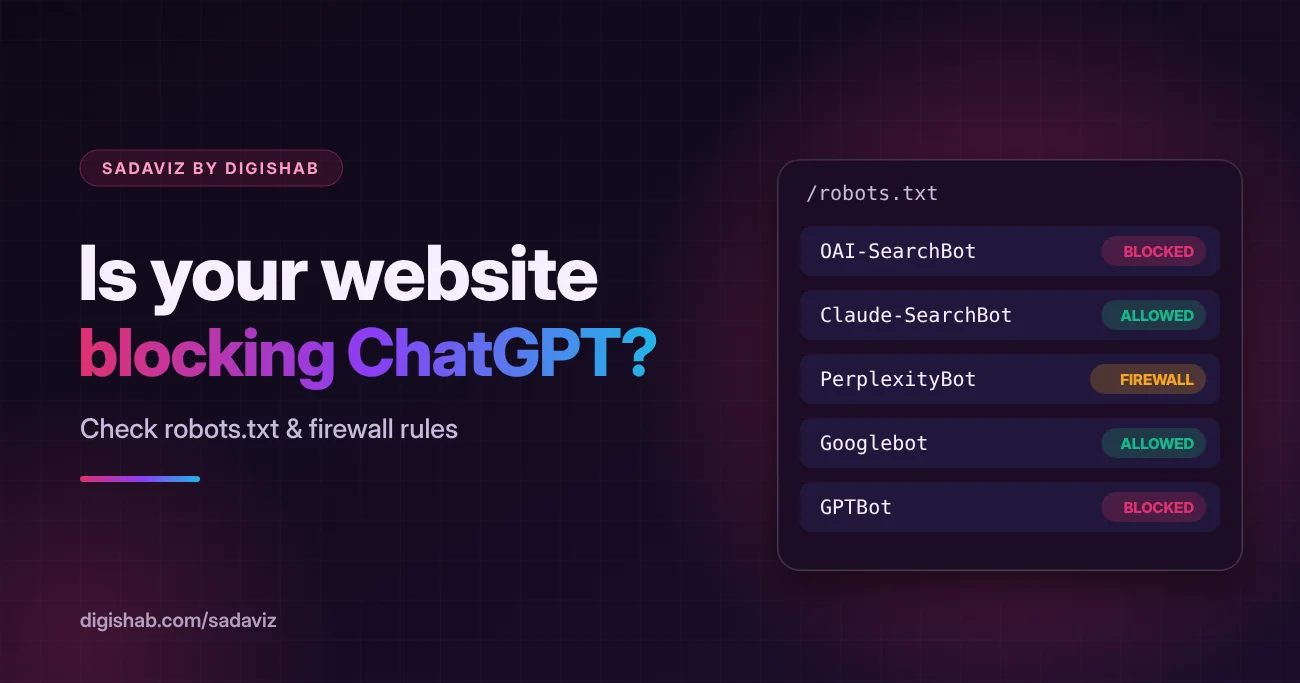
- OAI-SearchBot surfaces websites in ChatGPT search. OpenAI says sites that opt out of OAI-SearchBot will not be shown in ChatGPT search answers.
- GPTBot collects content for training. You can block it and still allow OAI-SearchBot.
- ChatGPT-User visits pages when a ChatGPT user asks it to. OpenAI notes that robots.txt rules may not apply to these user-initiated visits.
Anthropic (Claude)
- Claude-SearchBot indexes content for Claude’s search results. Blocking it can reduce your visibility in those answers.
- ClaudeBot collects content that may be used for training.
- Claude-User fetches pages when a Claude user asks a question that needs them.
Perplexity
- PerplexityBot indexes pages for Perplexity answers, and Perplexity-User fetches pages for user requests.
Google and Microsoft
- Googlebot powers Google Search, including AI Overviews and AI Mode. Never block it.
- Google-Extended is a separate control for whether your content is used for Gemini models. It does not affect how you appear in Google Search.
- Bingbot powers Bing and Microsoft Copilot, and Bing’s index is also used by other AI tools, so allow it too.
A Safe robots.txt for AI Visibility
If you want to appear in AI answers but prefer not to contribute to model training, a typical setup looks like this:
User-agent: OAI-SearchBot
Allow: /

User-agent: Claude-SearchBot
Allow: /

User-agent: PerplexityBot
Allow: /

User-agent: GPTBot
Disallow: /

User-agent: ClaudeBot
Disallow: /
Keep your normal rules for Googlebot and Bingbot, keep admin and private paths disallowed, and make sure your sitemap is listed. If you are happy for your content to be used in training, simply allow GPTBot and ClaudeBot as well.
Free AI scan
Can ChatGPT, Gemini and Claude recommend your business?
The free Sadaviz scan checks AI bot access, readable content, schema, quotable answers and trust signals in about 60 seconds, and explains every fix in plain language. Detailed report you can share on WhatsApp.
The Hidden Blocker: Your Firewall or CDN
robots.txt is only half the story. Security tools can block AI bots before they ever read robots.txt:
- CDN bot protection, such as Cloudflare’s AI crawler settings, which can block known AI bots with one switch
- WordPress security plugins with aggressive bot blocking or country blocking
- Hosting firewalls that rate-limit or block unknown user agents
- “Under attack” or JavaScript challenge modes that bots cannot pass
If your robots.txt allows a bot but your firewall returns a 403 error or a challenge page, the result is the same: the AI cannot read your site.
How to Check Your Own Website
- Open
yourdomain.com/robots.txtand look for rules that mention the bots above, or a blanketDisallow: /for all user agents. - Check your CDN or firewall dashboard for AI bot or “bot fight” settings.
- Look at your server logs or security plugin logs for blocked requests from these user agents.
- Or run the free Sadaviz scan, which tests each major AI bot separately and tells you whether it is allowed, blocked by robots.txt or blocked by a firewall.
Access Is Step One, Not the Finish Line
Unblocking the bots lets AI read your site. To be recommended, your pages also need readable HTML, schema markup, quotable answers and consistent business details. That is what our AI SEO service fixes. Read our guide to AI SEO for the full picture.
Talk to DigiShab
Want to know how AI sees your business? WhatsApp us: UAE +971 55 534 9010 · Saudi Arabia +966 53 462 3980 · info@digishab.com. Request a quote and we reply quickly.
Frequently Asked Questions
Should I block GPTBot?
It is your choice. Blocking GPTBot keeps your future content out of OpenAI’s training, but it does not remove you from ChatGPT search, which uses OAI-SearchBot.
Will blocking AI bots protect my content?
Partly. Blocking training bots limits use in model training, but blocking search bots also removes you from AI answers, which can cost you customers.
Does Google-Extended affect AI Overviews?
No. Google-Extended controls use for Gemini models. AI Overviews are part of Google Search, which uses Googlebot.
How long after unblocking will ChatGPT see my site?
OpenAI notes it can take around 24 hours for its systems to adjust after a robots.txt change. Being cited also depends on your content and reputation.
Can my security plugin block AI bots?
Yes. Aggressive bot rules, country blocking or challenge pages can stop AI bots even when robots.txt allows them.